How to Calibrate a Kitchen Scale?
If you bake or cook a lot, you know that a kitchen scale is one of your best friends in the kitchen. It helps you measure flour, sugar, meat, and other ingredients with real accuracy, so your recipes turn out right every single time. But here’s the thing: even the best digital kitchen scale or mechanical scale can drift out of true over time. That’s why learning how to calibrate a kitchen scale is such a useful skill. It’s not hard at all, and once you know the steps, you can do it in just a few minutes.
In this article
In this guide, we’ll walk through why calibration matters, how to tell if your scale needs it, and the exact steps to fix it. We’ll also cover common mistakes, tips for keeping your scale accurate long term, and answers to some frequent questions. Let’s get into it.
Why Calibration Matters So Much
A kitchen scale that reads wrong can throw off your whole recipe. Baking is basically a science experiment, and small errors in weight measurement can lead to dense bread, flat cakes, or cookies that spread too much. Even savory cooking benefits from correct portion sizes and ingredient ratios.
Over time, scales lose their accuracy for a bunch of reasons: dropping the scale, moving it around a lot, changes in temperature, weak batteries, or just normal wear on the internal sensors (called load cells or strain gauges). A digital scale that’s off by even a few grams can add up fast, especially in recipes that call for precise amounts of yeast, baking soda, or spices.
Calibrating your scale on a regular basis keeps your weight measurements trustworthy. It also extends the life of the device and gives you confidence every time you step into the kitchen.
Signs Your Kitchen Scale Needs Calibration
Before jumping into the calibration steps, it helps to know when your scale actually needs attention. Here are some clear warning signs:
- The scale doesn’t return to zero after you remove an item.
- Known weights (like a bag of sugar with a printed weight) don’t match what the scale shows.
- Readings change slightly each time you place the same object on it.
- The scale feels wobbly or the display flickers.
- You recently changed the batteries or moved the scale to a new spot.
- It’s been a long time since you last checked its accuracy.
If any of these sound familiar, it’s a good time to run a calibration check.
Types of Kitchen Scales and How Calibration Differs
Not every kitchen scale calibrates the same way, so it helps to know what kind you own.
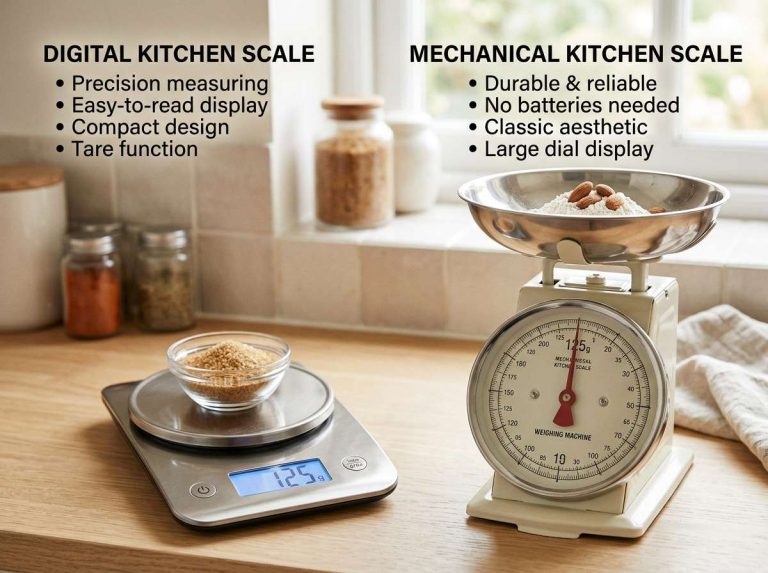
Digital Kitchen Scales
Most modern kitchen scales are digital, and many come with a built-in calibration mode. These usually need a specific calibration weight, measured in grams, to complete the process. Some higher-end digital scales even tell you the exact weight to use in the manual.
Mechanical (Spring) Scales
Older or simpler scales use a spring mechanism. These usually have a small screw or dial underneath the platform that you turn to adjust the zero point. There’s no digital calibration mode here, just a manual adjustment.
Scales Without a Calibration Mode
Some cheaper digital scales don’t offer a formal calibration setting at all. In that case, you can only check accuracy using known weights, and if it’s off, there may not be a way to fix it beyond replacing the batteries or resetting the device.
Knowing your scale type helps you follow the right steps below.
What You’ll Need Before You Start
Gathering a few simple items ahead of time makes the process smooth:
- A calibration weight (this could be an official scale calibration weight, or a household item with a printed and confirmed weight, like a roll of coins or a bag of sugar)
- Fresh batteries, just in case
- A flat, stable surface, away from wind or vibration
- The scale’s instruction manual, if you still have it, since exact steps can vary by brand
- A soft cloth to clean the platform before testing
Having these ready means you won’t need to pause halfway through.
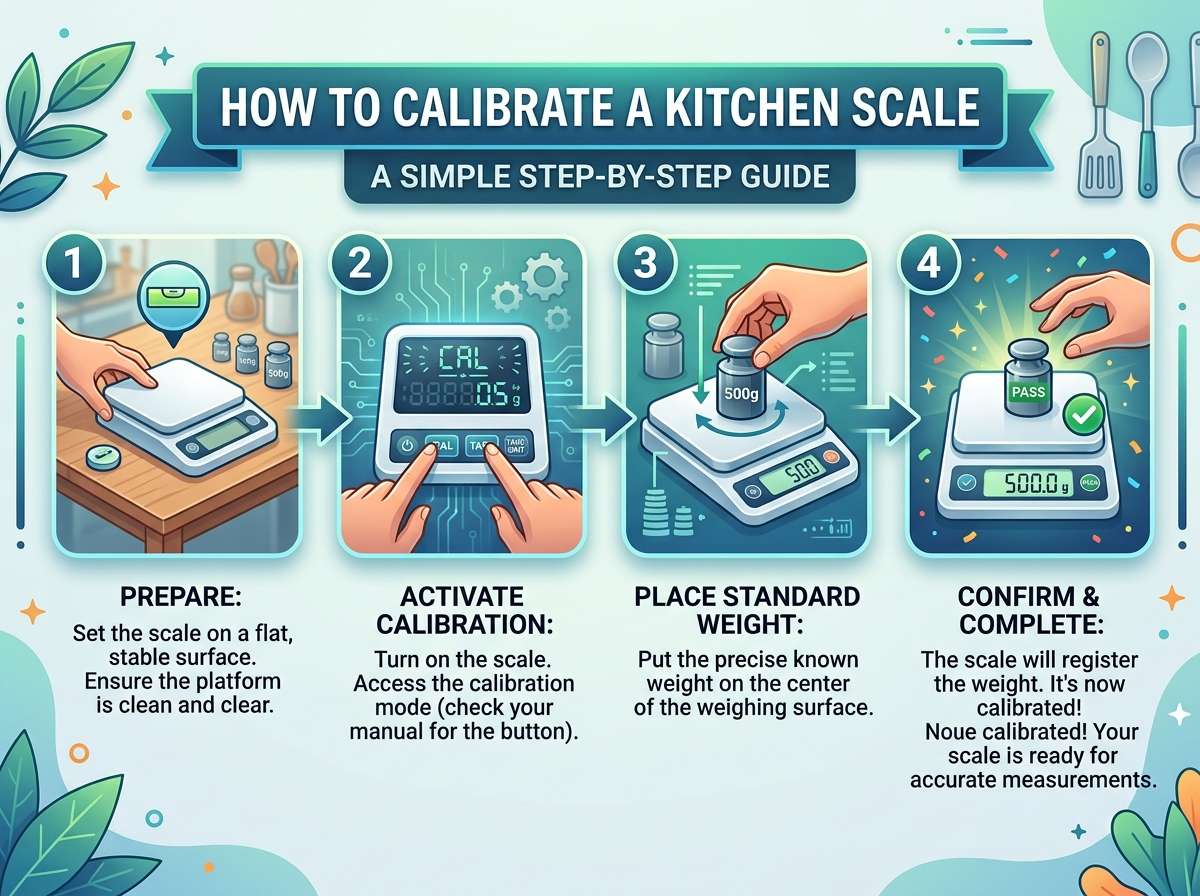
Step-by-Step: How to Calibrate a Digital Kitchen Scale
Here’s the general process most digital scales follow. Keep in mind that button names and menu steps can vary slightly depending on the brand and model, so check your manual if something doesn’t match.
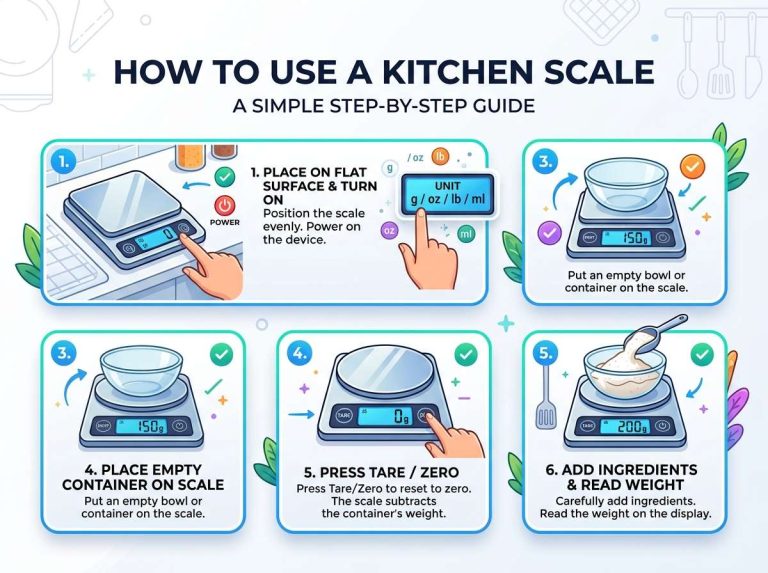
Step 1: Place the Scale on a Flat, Stable Surface
Set the scale on a hard, level countertop. Avoid rugs, uneven tables, or spots near a fan or open window, since air movement can affect the reading. A flat surface gives the internal sensors a fair baseline to work from.
Step 2: Turn On the Scale and Let It Settle
Power it on and give it a few seconds to boot up fully. Many scales show a quick animation or a series of zeros before they’re ready to use.
Step 3: Zero Out the Scale
With nothing on the platform, press the “zero” or “tare” button. The display should read 0.0 g or 0.0 oz. This step resets the baseline before you introduce a known weight.
Step 4: Enter Calibration Mode
This step depends heavily on your specific model. Common ways to enter calibration mode include:
- Holding down the “on/off” button and the “unit” button at the same time
- Pressing and holding the “mode” button for several seconds
- Turning the scale on while already pressing another button
The display often shows something like “CAL” or a flashing number once you’re in calibration mode.
Step 5: Add the Calibration Weight
Once the scale shows a specific number (often 100g, 200g, or 500g, depending on the model), place a weight matching that exact number on the platform. This is why having a proper calibration weight is so helpful, since guessing the wrong weight will give you an inaccurate result.
Step 6: Wait for Confirmation
The scale usually beeps, flashes, or displays a checkmark once it accepts the weight. This confirms the internal sensor has locked in a new reference point.
Step 7: Remove the Weight and Test Again
Take the weight off, let the scale return to zero, then place it back on. If the display shows the correct number this time, congratulations, your scale is calibrated. If not, repeat the process from step 3.
Step-by-Step: How to Calibrate a Mechanical Scale
If you’re working with a spring-based mechanical scale, the steps look a bit different since there’s no digital menu involved.
Step 1: Set the Scale on a Flat Surface
Just like with digital models, a stable, level surface is key for an accurate baseline.
Step 2: Check the Zero Point
With nothing on the platform, look at the dial. It should point exactly to zero. If it doesn’t, there’s usually a small adjustment screw on the bottom or side of the scale.
Step 3: Adjust the Screw
Using a small screwdriver, turn the adjustment screw gently until the dial lines up with zero. Small movements go a long way here, so turn it slowly and check often.
Step 4: Test With a Known Weight
Place an item with a known, printed weight on the platform. Compare the dial reading to the actual weight. If they match, you’re done. If not, repeat the adjustment.
Step 5: Double Check With a Different Object
Testing with a second item helps confirm the scale reads consistently across different weights, not just one specific number.
How to Check Accuracy Without an Official Calibration Weight
Not everyone owns a certified calibration weight, and that’s completely fine. Plenty of household items have printed weights you can use instead:
- A sealed bag of sugar or flour (check the label for the exact weight)
- Rolls of coins (many coins have a standard, well-documented weight)
- Canned goods with printed net weight
- Bottled water (since 1 milliliter of water equals roughly 1 gram, a bottle with a known volume gives a solid reference)
Using one of these items, place it on the scale after zeroing it out. If the reading closely matches the printed or known weight, your scale is likely accurate. If there’s a noticeable gap, it’s time for a proper calibration.
Common Mistakes to Avoid
Even a simple task like this can go sideways if you’re not careful. Here are a few things to watch out for:
Skipping the zeroing step. Always zero out the scale before adding any weight. Skipping this throws off every reading that follows.
Using a surface that isn’t level. A tilted counter or wobbly table can quietly mess with the sensor, even if the difference feels tiny to your eyes.
Placing the weight off-center. Always set weights right in the middle of the platform. Off-center placement can cause slightly inaccurate readings on some models.
Ignoring temperature changes. Cold or hot rooms can affect sensor performance temporarily. Let the scale sit at room temperature for a bit before testing.
Forgetting to replace old batteries. Weak batteries are one of the most overlooked causes of scale drift. If your readings seem off, swap the batteries first before assuming the sensor itself is broken.
Using the wrong calibration weight. Entering calibration mode and placing an incorrect weight (say, 100g when the scale expects 200g) will actually make your scale less accurate, not more.
How Often Should You Calibrate Your Kitchen Scale?
There’s no strict rule here, but a general guideline works well for most home cooks:
- Check accuracy every few months for scales used often
- Calibrate right away if you drop the scale or move it to a new location
- Test it after replacing batteries
- Recalibrate if you notice inconsistent readings during regular use
Bakers and anyone working with precise recipes might want to check more frequently, since even small errors matter more in baking than in general cooking.
Tips for Keeping Your Scale Accurate Long Term
A few small habits go a long way toward keeping your scale reliable:
- Store it somewhere flat and stable, away from edges where it might get bumped or dropped
- Keep the platform clean and free of crumbs, flour dust, or spills
- Avoid placing very hot or very cold items directly on the scale
- Remove batteries if you won’t use the scale for a long stretch, to prevent corrosion
- Handle it gently, since internal sensors are sensitive to shocks and drops
Treating your scale with a bit of care means fewer calibration sessions down the road.
Frequently Asked Questions
Does every digital scale have a calibration mode? Not always. Some budget models skip this feature entirely. If yours doesn’t have one, your only real option is checking accuracy with known weights and possibly resetting the scale.
Can I use any object as a calibration weight? Only if you’re certain of its exact weight. Random objects without a printed weight won’t help, since you need something precise for the process to work correctly.
Why does my scale show different numbers each time I weigh the same item? This often points to a low battery, an uneven surface, or a sensor that needs calibration. Try fresh batteries and a flat surface first.
Is it normal for scales to drift out of calibration over time? Yes, this is completely normal, especially with regular use. Internal sensors naturally shift slightly, which is why periodic checks are a smart habit.
What unit should I use for calibration, grams or ounces? Grams are usually more precise and are the standard unit most calibration weights use. Switching your scale to grams during calibration often gives more reliable results.
Wrapping It Up
Learning how to calibrate a kitchen scale gives you one more tool for cooking and baking with confidence. It’s a quick process, doesn’t require any special skills, and makes a real difference in how consistent your recipes turn out. Whether you’re weighing flour for bread, portioning meat for dinner, or measuring exact amounts for a delicate dessert, an accurate scale takes the guesswork out of the process.
Keep an eye out for the warning signs we covered, gather a proper calibration weight, and run through the steps every so often to keep your scale honest. With just a little maintenance, your kitchen scale will stay a reliable partner in the kitchen for a long time to come.

Mary is a home cooking enthusiast and kitchen gear reviewer with a passion for practical cookware and food preparation tools. She enjoys testing cutting boards, knives, kitchen gadgets, and other cooking essentials to help home chefs make smarter buying decisions. Through KitchenCutting.com, Mary shares honest product reviews, buying guides, and helpful kitchen tips to make cooking easier, safer, and more enjoyable.