Why Is My Kitchen Scale Inaccurate
If you have asked yourself why is my kitchen scale inaccurate, you are not alone. Many people notice that a scale gives a different number each time they weigh the same flour, or that a recipe turns out wrong even though the measurements looked right. Small errors on a kitchen scale can change how baked goods rise, how sauces thicken, and how portions turn out.
This article explains how kitchen scales measure weight, what accuracy really means, and the most common reasons readings drift. It also walks through simple checks you can do at home, how calibration works, and when a scale should be repaired or replaced. No prior knowledge is needed.
Key Takeaways
- Most inaccurate readings come from simple causes, such as weak batteries, a dirty platform, or an uneven surface.
- Kitchen scales use a sensor that bends slightly under weight and turns that change into a number.
- A quick test with a known weight can show if the scale is reading correctly.
- Many problems can be fixed by cleaning, leveling, replacing batteries, and recalibrating.
- If the reading stays wrong after these steps, the sensor or electronics may need repair or replacement.
Why Kitchen Scales Drift Off and How to Spot It
Scales can drift slowly, so the change is easy to miss. A reading that is off by a few grams may not seem like a problem at first. Over time, though, that small gap can affect recipes that depend on precise amounts.
To spot drift, weigh an object you know well and watch if the number changes. Repeat the test a few times. If the results do not match, the scale needs a closer look.
Why Is My Kitchen Scale Inaccurate? The Basics
A kitchen scale is designed to show weight as clearly as possible. When the number seems wrong, the cause is usually something in the scale itself or in how it is used. Knowing the basics makes the problem easier to find.
What Accuracy Means for a Kitchen Scale
Accuracy describes how close a reading is to the true weight of an object. A scale that shows 500 grams for an item that truly weighs 500 grams is accurate. A scale that shows 520 grams for the same item is off.
Scales also have a precision level, which is how finely they show small changes. Precision and accuracy are different. A scale can show many decimal places and still be inaccurate.
How a Typical Kitchen Scale Measures Weight
Most kitchen scales have a flat platform on top of a sensor. When you place food on the platform, the sensor responds to the force. The scale then converts that response into a number on the display.
Because the sensor depends on this force, anything that changes the force can change the reading. Dirt, uneven surfaces, and weak power can all do this.
Common Signs Your Scale Is Giving Wrong Readings
Some signs point to inaccuracy. The display may show a number that does not match a known weight. The reading may keep changing even when nothing moves. The zero point may not return to zero after you remove an item.
Other signs include a reading that is different each time you place the same object, or a scale that reacts only when you press on one side. These clues help narrow down the cause.
How Kitchen Scales Work Inside
Looking at what happens inside a scale can make the problem easier to understand. You do not need to be an engineer to follow the basic idea. The key parts are the sensor, the circuit board, and the display.
Load Cells and Strain Gauges Explained
Many digital kitchen scales use a load cell. A load cell is a small metal part that bends slightly when weight presses on it. The bend is tiny, far too small to see.
Attached to the load cell are thin wires called strain gauges. When the metal bends, the strain gauges change their electrical resistance. The circuit board reads that change and and turns it into a weight value shown on the display.
Because this process is electrical, it depends on a steady power supply and clean, well-made parts.
Digital Scales Versus Mechanical Spring Scales
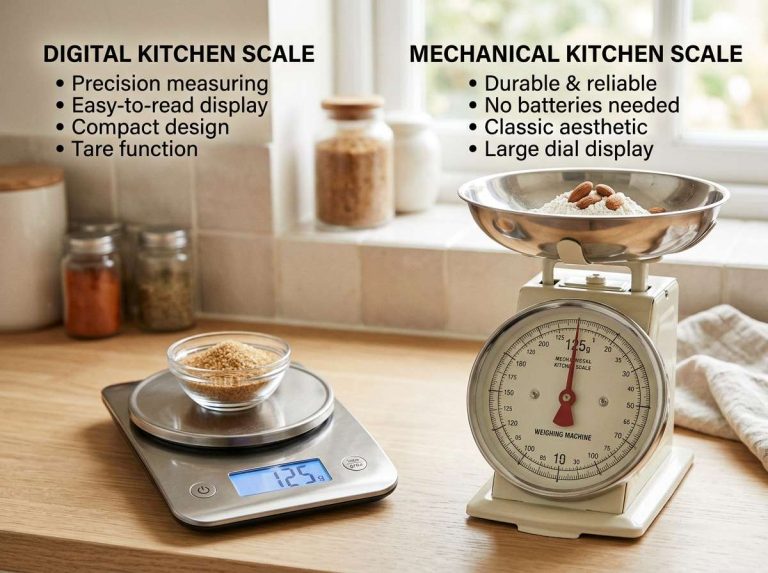
Digital scales use electronics to read the sensor and show a number. Mechanical scales use a spring and a dial or pointer.
The spring stretches or compresses under weight, and the pointer moves to show the result. Each type can drift for different reasons. Digital scales are affected by batteries and electronics. Mechanical scales can lose accuracy when the spring weakens or the pointer slips out of position.
Why Sensors Can Lose Calibration Over Time
Calibration is the process of adjusting a scale so its readings match known weights. Over time, the sensor and its supporting parts can shift slightly. Repeated loads, bumps, and temperature changes can all contribute. This shift is usually gradual. As a result, a scale that was accurate when new may slowly read a little high or low. Regular checks help catch this early.
Common Causes of Inaccurate Kitchen Scale Readings
Most inaccurate readings come from a short list of causes. Some are easy to fix at home. Others point to a part that needs repair. Going through the common causes one at a time is a practical way to find the problem.
Uneven or Soft Surfaces
A scale needs a firm, level surface to read correctly. On a soft or uneven surface, such as a cloth, a tray, or a sloped counter, the platform can tilt or press unevenly on the sensor. This can push the reading up or down. Place the scale on a hard, flat counter and check that it sits steadily without rocking.
Low or Weak Batteries
Digital scales rely on battery power to run the sensor and display. When batteries weaken, the electronics may give unstable or incorrect readings. The number may flicker, drift, or fail to return to zero. Replacing the batteries is one of the simplest fixes. Many people overlook this step, so it is worth checking first.
Dirt, Crumbs and Spilled Food on the Platform
Crumbs, flour, sticky sauces, and other residue can build up on the platform or under its edges. This extra material adds weight the scale is not meant to read. It can also block the platform from moving freely. Wiping the platform after each use helps keep readings steady.
Temperature and Humidity Effects
Temperature and humidity can affect the electronics and sensor in a scale. Large swings in heat or moisture may cause small shifts in readings. A scale kept near a stove, dishwasher, or sink may be more exposed to these changes. Storing the scale in a stable, dry place can reduce this effect.
Overloading the Scale Beyond Its Capacity
Every kitchen scale has a maximum weight it can handle, called its capacity. Placing an item heavier than this limit can strain the sensor. The scale may then give wrong readings or stop working properly. Check the rated capacity before weighing large or heavy items. Staying within the limit protects the sensor.
Placing Heavy Items or Pressing on the Edges
Scales are designed to read weight evenly across the platform. Pressing down on one edge, or placing a heavy item at the far side, can give a misleading reading. Some scales are more sensitive to off-center loads than others. Place items near the center of the platform. Avoid leaning on the scale while reading it.
Step-by-Step Checks to Find the Problem
A few simple checks can reveal the cause of most inaccurate readings. Working through them in order saves time. Start with the easiest checks before moving on to more involved steps.
Check the Batteries and Power Source
Begin by confirming that the scale has power. Replace the batteries with fresh ones, and make sure they are installed correctly. If the scale uses a power adapter, check that it is plugged in securely. Then turn the scale on and see if the display steadies.
Clean the Weighing Platform Properly
Remove the platform if the design allows, and wipe away any residue. Check the area underneath for crumbs. Use a soft, dry cloth, and avoid soaking the scale or using harsh cleaners that could damage the surface. Make sure the platform sits back in place correctly before you test it again.
Test with a Known Weight
Use an object whose weight you already know, such as a bag of flour with the weight printed on the label or a standard weight if you have one. Place it in the center of the platform and read the display.
A reading close to the labeled weight suggests the scale is working well. Repeat the test a few times. If the number changes each time, the scale may have an unstable sensor or a power problem.
Use the Zero or Tare Function Correctly
The zero, or tare, button resets the display to zero. This lets you weigh ingredients in a bowl without counting the bowl’s weight. Press it with nothing on the platform, then wait until the display settles at zero before adding anything.
If the scale does not return to zero on its own, or if it shows a number before anything is placed, the zero point may be off. This is a common sign of a calibration issue.
Level the Scale and Test Again
Many kitchen scales have small feet that can be adjusted. Check if the scale rocks when you press a corner. If it does, adjust the feet or move the scale to a flatter spot. Once it sits steadily, repeat the known-weight test. Compare the new result with the earlier one.
How to Calibrate a Kitchen Scale
Calibration adjusts the scale so its readings match known weights. Many digital scales have a calibration mode built into the settings. The steps vary by model, so the user manual is the best guide. The general idea stays the same across models.
Calibration Using Standard Weights
Standard weights are objects with a precise, certified mass. They are the most reliable way to calibrate a scale. Place the standard weight on the platform when the scale asks for it, and let it confirm the value. This method gives the most accurate result because the reference weight is known exactly.
Calibration with Coins or Household Objects
Some people use coins or other household items to check a scale. Coins have a standard mass, but small differences in wear and manufacturing can affect results. Household objects are less reliable than standard weights. This method can still help spot a large error. For fine accuracy, a standard weight is the better choice.
When Calibration Will Not Fix the Problem
Calibration cannot repair a damaged sensor or failing electronics. If the scale still gives unstable or incorrect readings after calibration, the hardware may be at fault. A cracked platform, a loose connection, or a bent load cell are examples of physical faults that calibration will not solve. In these cases, repair or replacement may be the better option.
Digital Kitchen Scale Versus Analog Kitchen Scale
Digital and analog kitchen scales work in different ways. Each has its own strengths and weaknesses. Knowing the differences can help you understand where inaccuracy is likely to come from.
Accuracy Differences Between Scale Types
Digital scales often show finer steps in the reading, which can make small amounts easier to measure. Their accuracy depends on the sensor and electronics, and on keeping batteries strong. Analog scales rely on a spring and pointer, so they can be affected by wear and by how the dial is read.
Neither type is automatically more accurate. The quality of the build and the care given to the scale matter more than the display style.
Which Type Suits Everyday Baking and Cooking
Many home cooks use digital scales for baking, because they show small weights clearly and offer a tare function. Analog scales can work well for rough portioning, where exact amounts matter less. Both types can give useful results when they are kept clean, level, and in good working order. The right choice depends on how precise your recipes need to be and how you prefer to read the display.
Examples of Common Scenarios and Fixes
Real situations often make the cause easier to see. The examples below show common patterns and simple fixes. Each one starts with a symptom and suggests what to check first.
The Scale Reads Higher Than Expected
A scale that reads high may have residue on the platform, a tilted surface, or a zero point that is not set correctly. Clean the plat form and check that the scale is level. Then press the zero button with nothing on it and confirm the display returns to zero.
Repeat the known-weight test to see if the reading has settled.
The Scale Reads Lower Than Expected
A reading that comes out low can point to weak batteries, a sensor that has shifted, or an item that is not sitting in the center.
Replace the batteries first and place the object near the middle of the platform. If the reading stays low, calibration may help bring the scale back in line.
The Reading Keeps Changing or Drifting
A number that keeps climbing or dropping, even when nothing changes, often comes from unstable power or an unlevel surface.
Check the batteries and move the scale to a firm, flat counter. Keep the scale away from drafts, heat sources, and any vibration from appliances. Because this symptom can also signal a sensor problem, note if the drift continues after these fixes.
The Scale Shows Zero Before Anything Is Placed
A display that shows a number before anything is on the scale may have a zero point that has moved. Some scales also show a small number because of a container or residue left on the platform. Clear the platform, press the zero button, and check again. If the number returns, a calibration reset is usually the next step. Consult the manual for the correct procedure.
Tips to Keep Your Kitchen Scale Accurate
Good habits can prevent many problems. Simple care keeps the sensor and electronics in better shape. These tips take little effort and fit easily into regular kitchen routines.
Store the Scale in a Dry, Stable Place
Keep the scale away from sinks, steam, and direct heat. A dry cabinet or a stable countertop spot works well. Stable storage helps the sensor stay steady over time.
Avoid Dropping or Knocking the Scale
Sharp impacts can strain the load cell or loosen internal parts. Handle the scale gently when moving it, and avoid sliding heavy pans across the platform. Careful handling protects the sensor from unnecessary wear.
Replace Batteries on a Regular Schedule
Weak batteries cause unstable readings, so replace them before they run low. Some people change batteries at the same time each season to keep the habit simple. Remove batteries if the scale will sit unused for a long period.
Recheck Accuracy Every Few Months
Repeat the known-weight test on a regular basis. A quick check can catch drift before it affects your cooking. If the results change over time, calibration or repair may be needed.
When to Repair or Replace Your Kitchen Scale
Some problems can be fixed at home, while others point to a failing part. Knowing the difference helps you decide if a repair is worth the effort. It also helps you avoid spending money on a part that cannot be saved.
Signs the Sensor or Electronics Have Failed
Warning signs include a display that will not settle, readings that jump even on a stable surface, or a scale that does not respond at all. Visible damage, such as a cracked platform or a loose wire, also suggests a hardware fault. Calibration will not solve these issues. If a fresh set of batteries and a clean platform do not help, the sensor or circuit board may need professional attention.
Weighing the Cost of Repair Against a New Scale
Compare the likely cost of repair with the price of a new scale. For a low-cost kitchen scale, replacement is often simpler than repair. For a more expensive model, a repair may make sense if the parts are available and the manufacturer offers service. Check the warranty terms before deciding, since a repair may be covered. In short, the choice depends on the scale’s value, its condition, and how much accuracy you need.
Frequently Asked Questions
Why does my kitchen scale show a different weight each time I weigh the same item?
This usually points to unstable power, an uneven surface, or residue on the platform. Weak batteries are a frequent cause. Check these first, then repeat the test on a firm, flat counter.
Can I fix an inaccurate kitchen scale myself?
Many common problems could be fixed at home, such as replacing batteries, cleaning the platform, leveling the scale, or running a calibration. If the reading stays unstable after these steps, the sensor or electronics may need professional repair or replacement. Checking the user manual first is always a good idea.
How do I know if my kitchen scale needs calibration?
A scale that shows a number before anything is placed on it, or that gives different readings for a known weight, may need calibration. Compare the display with a standard weight or a labeled item. If the difference is consistent, calibration is a reasonable next step.
Does a kitchen scale lose accuracy with age?
Yes, the sensor and supporting parts can shift gradually over time. Regular use, bumps, and temperature changes all contribute. Periodic checks with a known weight help catch this early, so adjustments can be made before recipes are affected.
Why does my kitchen scale read zero when something is on it?
This can happen if the scale is set to tare with the object already on it, or if the platform is blocked or damaged. It can also point to a sensor fault. Remove everything, press the zero button, and then add the item again to see if the reading changes.
Conclusion: Keeping Your Kitchen Scale Reading Correctly
An inaccurate kitchen scale is often caused by simple, fixable issues. Weak batteries, dirt on the platform, uneven surfaces, and overloading are common culprits. A quick test with a known weight can show if the scale is working as it should.
Regular cleaning, careful storage, and periodic checks go a long way toward steady readings. When problems remain after these steps, calibration or repair may be needed. In short, a little attention keeps your kitchen scale reliable for everyday cooking and baking.

Mary is a home cooking enthusiast and kitchen gear reviewer with a passion for practical cookware and food preparation tools. She enjoys testing cutting boards, knives, kitchen gadgets, and other cooking essentials to help home chefs make smarter buying decisions. Through KitchenCutting.com, Mary shares honest product reviews, buying guides, and helpful kitchen tips to make cooking easier, safer, and more enjoyable.